Audio engineering

If your TRRS audio plug is not functioning correctly, follow these troubleshooting steps to identify and resolve the issue:
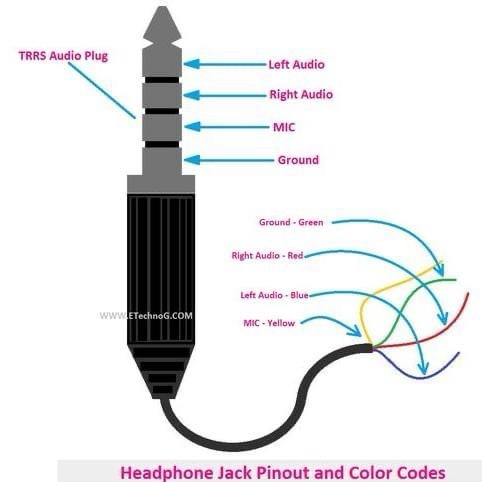
1. Check for Physical Damage:

Inspect the TRRS plug and cable: Look for any visible damage such as fraying, cuts, or bends that could affect the wiring. A damaged plug or cable might cause issues with sound output or microphone input.

Test with a known working device: Plug the TRRS connector into another device (such as a different phone, laptop, or headset) to determine if the issue lies with the plug or the original device.

2. Confirm Proper Connection:

Ensure the TRRS plug is fully inserted: A loose connection can lead to sound distortion, no sound, or microphone issues. Ensure the plug is pushed all the way into the headphone jack of your device.

Check the device’s headphone jack: Inspect the headphone jack for dust or dirt that might be preventing a full connection. Use compressed air or a cotton swab to clean the jack gently.

3. Verify Correct Wiring:

Check color coding: The TRRS plug should follow a specific color-coding scheme. The left audio should be connected to the tip (blue), right audio to the first ring (red), microphone to the second ring (yellow), and ground to the sleeve (green).

Test the wires individually: If possible, use a multimeter to test continuity of each wire inside the TRRS cable to ensure that each connection is intact.

4. Software or Driver Issues (for Computers or Laptops):

Check audio settings: Make sure the correct output (headphones) and input (microphone) devices are selected in the device’s audio settings. Sometimes, the system may default to the built-in speakers or microphone.

Update drivers: If you’re using a computer, ensure that the sound card or audio drivers are up-to-date. Outdated drivers may cause issues with microphone or headphone functionality.

Test with different software: Try using a different app (like a media player or communication app) to see if the issue is related to specific software settings.

5. Test on Other Devices:

Test on another device: Plug the TRRS headset into a different device (e.g., phone, tablet, or PC) to check if the issue persists across multiple devices. If it works on another device, the problem may lie with the original device’s headphone jack or settings.

Try different headphones or microphone: If available, try using another headset or microphone with the same device to rule out issues with the headset itself.

6. Check for Compatibility Issues:

Device compatibility: Ensure that the TRRS connector is compatible with your device. Some devices, especially older ones or those with a single TRS (Tip-Ring-Sleeve) jack, may not support a TRRS plug fully. In such cases, an adapter may be required to separate the audio and microphone signals.

7. Consider External Factors:

Interference from nearby electronics: Check if any nearby electronic devices are causing interference. Move the device and headphones away from other electronic equipment, which could affect audio performance.

Operating environment: If you’re in a noisy environment, confirm the microphone is not picking up excessive background noise, which might cause issues during use.

8. Replace or Repair:

Replace the cable: If the cable appears damaged or doesn’t function properly after troubleshooting, replacing the TRRS cable might be necessary.

Repair the connector: If the plug itself is faulty, consider re-soldering the connections or replacing the connector.

9. Contact Support:

• If none of these steps resolve the issue, consider reaching out to the device manufacturer or a professional technician for further help.

By following these troubleshooting steps, you should be able to identify whether the problem is with the TRRS plug, the cable, the device, or the software, and take appropriate action to resolve it.
Virtualizing Software in the 21st Century: A Paradigm Shift in Computing

In the 21st century, software virtualization has evolved from a niche technology into a cornerstone of modern computing. From optimizing hardware utilization to enabling agility in development and deployment, virtualization has transformed industries. This blog delves into the history, key innovations, benefits, and future prospects of software virtualization, backed by references to credible sources.

What is Virtualization?

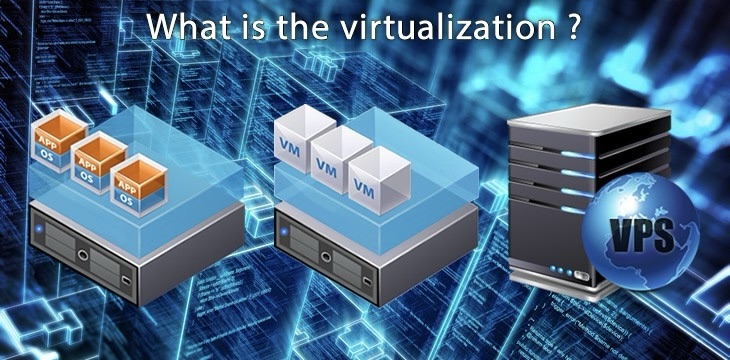
Virtualization refers to the process of creating virtual versions of computing resources—whether hardware, operating systems, storage, or networks. By decoupling these resources from their physical counterparts, virtualization enables flexibility, scalability, and efficient resource management.

In addition to traditional virtual machines (VMs), containerization—a more lightweight form of virtualization—has become prominent. Unlike VMs, which emulate an entire operating system, containers virtualize only the application and its dependencies, reducing overhead while increasing portability (Red Hat, 2023).

Furthermore, virtualization supports emerging technologies such as hybrid cloud environments and edge computing, where workloads need to move seamlessly across diverse infrastructures (VMware, 2023).

A Brief History of Virtualization

1. The Early Days: IBM Mainframes (1960s)

Virtualization began with IBM’s mainframes, where it was used to divide massive computing resources into smaller, manageable units. This allowed organizations to run multiple applications simultaneously, increasing productivity (Barak & La’adan, 2009).

2. Rise of Hypervisors (2000s)

The development of hypervisors, such as VMware’s ESX and Microsoft’s Hyper-V, marked a turning point. These platforms enabled the efficient sharing of physical resources among multiple virtual environments, bringing virtualization to enterprise data centers (VMware, 2023).

3. Containerization (2010s)

The introduction of Docker in 2013 revolutionized virtualization by allowing developers to package applications and their dependencies in isolated containers. This innovation reduced conflicts and improved scalability for cloud-native applications (TechCrunch, 2023).

4. Virtualization in Cloud Computing

Platforms like AWS and Microsoft Azure heavily utilize virtualization to deliver scalable infrastructure-as-a-service (IaaS). By abstracting physical resources, they provide users with flexible and cost-effective computing environments (Gartner Research, 2024).

5. Virtualization for Edge Computing

As edge computing gained momentum, virtualization technologies adapted to deploy lightweight instances closer to users, improving latency and performance in applications such as IoT and autonomous vehicles (Red Hat, 2023).

Key Benefits of Virtualization

1. Resource Efficiency

Virtualization significantly reduces hardware costs by allowing multiple virtual environments to operate on a single physical machine. This not only lowers initial investment but also decreases power consumption and cooling requirements (Barak & La’adan, 2009).

2. Scalability and Flexibility

Virtual environments can be scaled up or down depending on demand. This elasticity is particularly critical in industries with fluctuating workloads, such as e-commerce during peak seasons (VMware, 2023).

3. Improved Disaster Recovery

Virtual machines and containers are easier to back up and replicate than physical servers. Solutions like live migration allow businesses to recover quickly from hardware failures, ensuring high availability (Red Hat, 2023).

4. Reduced Hardware Dependency

Virtualization enables organizations to run legacy applications on modern hardware by emulating outdated environments, extending the lifespan of critical software systems (TechCrunch, 2023).

5. Enhanced Security

By isolating virtual environments, virtualization limits the impact of security breaches. For example, a compromised container cannot directly affect the host system, making it an effective safeguard against cyberattacks (Gartner Research, 2024).

6. Accelerated Development and Testing

Developers can spin up isolated environments for testing without interfering with production systems. This accelerates innovation cycles and allows for experimentation with minimal risk (Red Hat, 2023).

Notable Technologies Driving Virtualization

1. Hypervisors

Hypervisors like VMware ESXi, KVM, and Microsoft Hyper-V serve as the foundation of virtualization by enabling multiple operating systems to share a single physical host (VMware, 2023).

2. Containers

Containers, popularized by Docker and orchestrated by Kubernetes, have transformed how developers deploy applications. They provide lightweight isolation and simplify moving applications across environments (TechCrunch, 2023).

3. Cloud Computing

Public cloud platforms such as AWS, Microsoft Azure, and Google Cloud depend heavily on virtualization to deliver scalable, on-demand infrastructure and services (Gartner Research, 2024).

4. Software-Defined Infrastructure (SDI)

Virtualization extends beyond compute resources to networks and storage through SDI, enabling programmatic control and automation of the entire data center (Red Hat, 2023).

5. GPU Virtualization

With the rise of AI and machine learning, GPU virtualization technologies like NVIDIA vGPU allow multiple virtual environments to share high-performance graphics hardware, optimizing costs and performance (TechCrunch, 2023).

6. Serverless Computing

Though not virtualization in the traditional sense, serverless platforms leverage virtualization principles to abstract infrastructure management, enabling developers to focus solely on application logic (Gartner Research, 2024).

Conclusion

Virtualization is more than just a technology—it’s a paradigm shift enabling flexibility, scalability, and innovation. By embracing virtualization, organizations can stay ahead in an increasingly digital and dynamic world. From its roots in mainframes to its role in modern cloud and edge computing, virtualization will continue to redefine the boundaries of what is possible in computing.

References

1. Barak, A., & La’adan, O. (2009). The Virtualization of Operating Systems. ACM Transactions on Computer Systems. Available at: ACM Digital Library

2. VMware. (2023). The Role of Virtualization in Cloud Computing. Available at: VMware

3. Red Hat. (2023). What is Virtualization?. Available at: Red Hat

4. TechCrunch. (2023). Docker and Kubernetes Revolutionize Virtualization. Available at: TechCrunch

5. Gartner Research. (2024). Future Trends in Virtualization and Cloud Computing. Available at: Gartner

Directory Traversal: Explanation and Mitigation

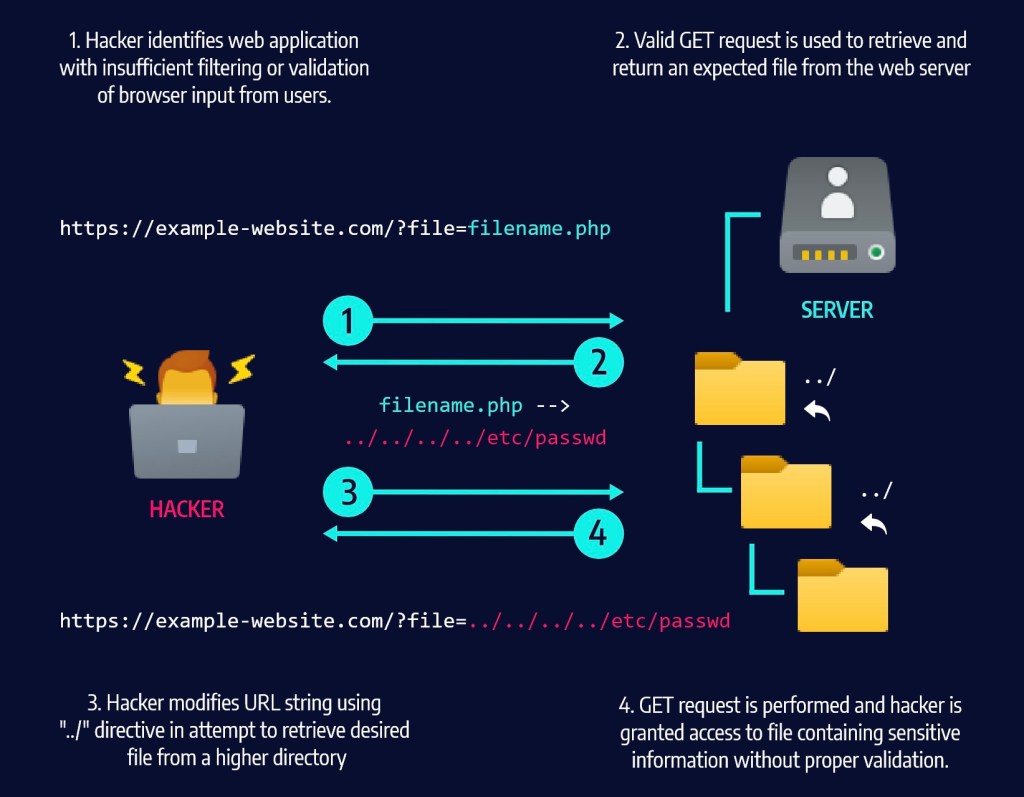
Directory Traversal Graphic Explanation

Directory traversal is a type of cyber attack in which an attacker attempts to gain unauthorized access to sensitive files on a server by traversing the server’s directory structure. This type of attack is particularly dangerous because it can allow attackers to gain access to files that are normally inaccessible, such as system and configuration files. The goal of this whitepaper is to detail various methods of mitigating the risk of directory traversal attacks.

One of the most common methods of mitigating the risk of directory traversal attacks is through the use of proper authentication and authorization. By requiring users to authenticate themselves before accessing files, the server can ensure that only authorized users are able to access sensitive information. Additionally, proper authorization rules should be implemented in order to prevent unauthorized users from gaining access to files they do not have permission to view. This can be done by assigning permissions to specific groups and users, thereby limiting the number of individuals who can view certain files.

Furthermore, servers should also utilize access controls specifically designed to prevent directory traversal attacks. For example, web servers should make sure that file requests are within the specified directory structure, and that all requests for files are made through standard HTTP protocols. Additionally, whitelisting specific files and directories can also help to mitigate the risk of directory traversal attacks. This prevents any unknown or malicious file requests from being processed.

Another method of mitigating directory traversal attacks is by implementing secure file deletion techniques. This can include the use of secure erase commands which overwrite files with random data in order to permanently delete them. Additionally, servers should also consider making use of data encryption techniques, which encodes files using complex algorithms and makes them unreadable unless the correct key is used.

Finally, servers should also monitor for attempts to access files outside of their expected directory structure. Detecting suspicious activity can help to identify potential attackers and alert administrators to take action. Moreover, logging requests to specific files can also help to identify malicious actors who are attempting to gain access to restricted information.

By implementing proper authentication and authorization, utilizing access controls, and monitoring for suspicious activity, organizations can better protect themselves against directory traversal attacks.

Design a site like this with WordPress.com
Get started